How to Choose the Right TV Mount for Your Screen Size and Wall Type: A Complete Guide
Learn how to match TV mounts to screen size, weight, and wall material. Expert guide covers VESA patterns, mount types, and proper hardware selection for secure installation.
Selecting the right TV mount depends on three core factors: the mount type, your TV's physical specifications, and the wall material you'll anchor into. This guide shows how to match mounts to screen size and weight, interpret VESA mount dimensions, and choose anchors for drywall, masonry, plaster, and metal studs so you get a safe, level, and aesthetically pleasing installation.
What Are the Different Types of TV Mounts and Which One Suits Your Needs?
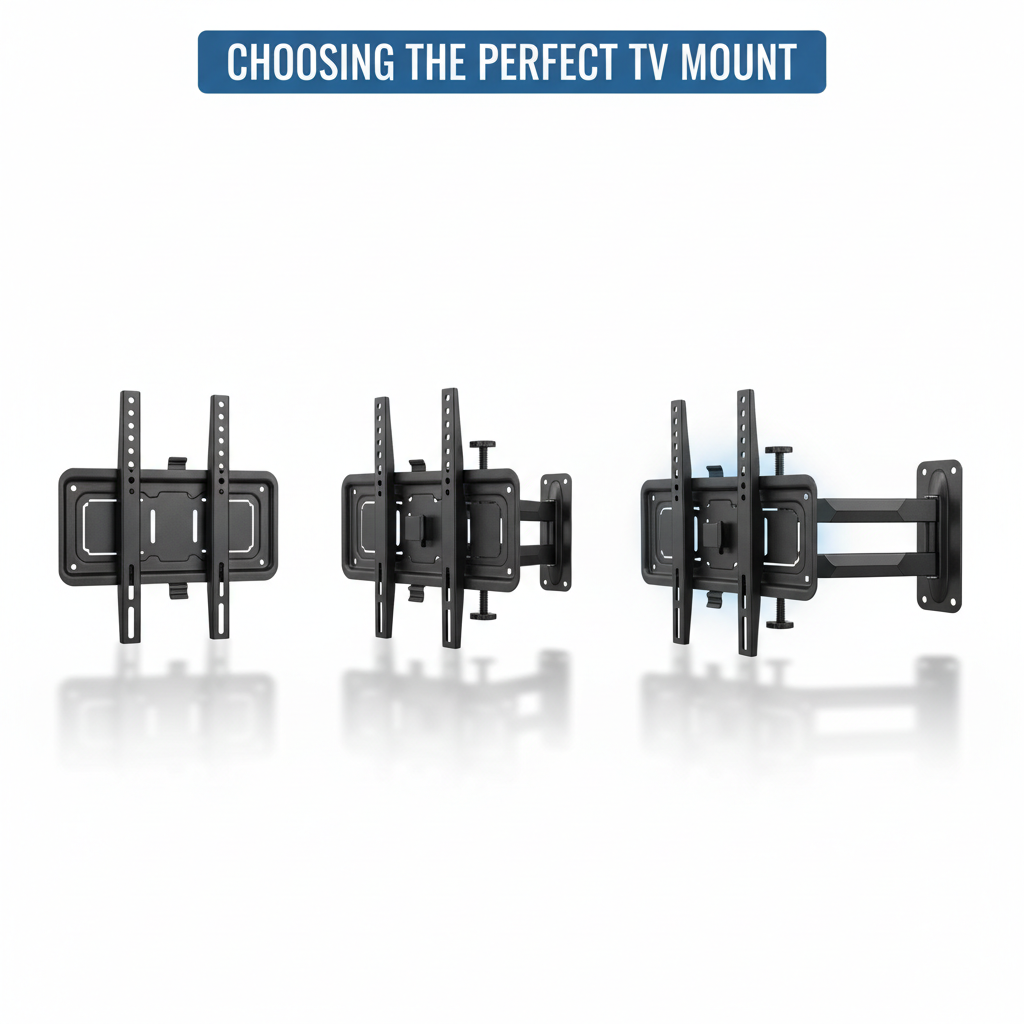
A TV mount is the hardware system that secures a display to a wall, ceiling, or furniture; its mechanism determines adjustability, load distribution, and viewing flexibility. Understanding mount categories lets you prioritize low-profile aesthetics, adjustable ergonomics, or maximum articulation for corner and multi-view setups.
Different Mount Types
- Fixed TV mount: Low-profile bracket that holds the TV flat against the wall; ideal for single viewing positions and minimalist installations.
- Tilting TV mount: Allows vertical angle change to reduce glare or lower the viewing angle from high placements such as over fireplaces.
- Full-motion TV mount (articulating): Offers swivel, extension, and tilt to serve multiple seating areas or corner placements.
- Specialty mounts: Includes ceiling, pull-down, fireplace, and curved-screen-specific brackets for niche installations.
Mount Type Comparison
| Mount Type | Key Feature(s) | Best Use Case |
|---|---|---|
| Fixed TV mount | Low-profile, rigid wall plate | Single-view seating, minimalist look |
| Tilting TV mount | Vertical angle adjustment (tilt) | High mounts, glare reduction, fireplace installs |
| Full-motion TV mount | Swivel, extension, tilt (articulation) | Multi-seat rooms, corner installs |
| Specialty mounts | Customized brackets (ceiling, pull-down, curved) | Unique geometry, fireplace, curved screens |
How Do You Match Your TV Screen Size and Weight to the Right Mount?
Matching a TV to its mount requires measuring the diagonal screen size, checking the TV's weight, and confirming the VESA mounting pattern. These three attributes determine the mechanical compatibility and safety margin you need.
How to Verify Compatibility
- Measure the diagonal screen size: Measure corner-to-corner of the visible screen and note the manufacturer's listed size.
- Check TV weight: Find the TV's shipping or net weight in the spec sheet and allow a 20–30% safety margin.
- Confirm VESA pattern: Measure horizontal and vertical hole distances in millimeters and match to the mount.
Why TV Weight Matters
TV weight matters because the mount and wall anchors must safely support static and dynamic loads. Installers commonly recommend choosing a mount with a capacity at least 20–30% greater than the TV's weight to protect against overload.
VESA Compatibility
VESA is the standardized metric specification for mounting hole spacing. Measure the horizontal and vertical distances between the center of the mounting holes in millimeters to read patterns like 200x200 or 400x400 mm. If your TV's VESA pattern doesn't match the mount, you can use adapter plates.
VESA to Mount Mapping
| TV Size / VESA | Weight Capacity Guideline | Suggested Mount Class |
|---|---|---|
| 32" and smaller / 75x75–100x100 | ≤ 15 kg (33 lb) | Fixed or tilting lightweight |
| 40"–55" / 200x200–200x400 | 15–30 kg (33–66 lb) | Tilting or small full-motion |
| 55"–75" / 400x400–600x400 | 30–50+ kg (66–110 lb) | Heavy-duty full-motion or fixed heavy-duty |
| 75"+ / large VESA patterns | 50+ kg (110+ lb) | Heavy duty mount and professional installation recommended |
How to Choose the Right TV Mount for Your Wall Type?
Wall substrate determines anchor type, drilling method, and installation difficulty. Choosing the correct anchor prevents pull-through, cracking, or progressive failure.
Best Mounting Options for Drywall with Wood Studs
For drywall over wood studs, the strongest approach is to anchor the mount's wall plate into at least two studs using appropriately sized lag bolts. Using a washer and ensuring full thread engagement maximizes load distribution and reduces pull-out risk.
Mounting on Drywall Without Studs
Mounting without studs is possible but limited. Studless anchors like toggles, molly bolts, or engineered hollow-wall anchors can support moderate weights but usually have lower load ratings than stud anchors.
Mounting on Concrete, Brick, or Masonry Walls
Masonry mounting requires masonry anchors or concrete screws installed with a hammer drill and correct diameter masonry bit. Use anchors rated for shear and pull-out, and ensure dust evacuation from drilled holes.
Challenges of Mounting on Plaster or Metal Stud Walls
Plaster walls can be brittle and bonded to lath, which risks cracking if heavy loads are concentrated without backing. Metal studs lack the shear strength of wood and require specialized anchors like threaded inserts or toggles anchored to the stud flange.
Wall-Anchoring Options
| Wall Type | Recommended Anchors / Hardware | Difficulty / Notes |
|---|---|---|
| Drywall over wood studs | Lag bolts into two studs, washers, pilot holes | Moderate; strongest option for heavy TVs |
| Drywall (no studs) | Heavy-duty toggle bolts, hollow-wall anchors | Higher risk; limited weight capacity |
| Concrete / brick / masonry | Concrete screws, expansion anchors, epoxy anchors | Requires hammer drill; high strength when done correctly |
| Plaster / lath | Backing/blocking, through-bolt or reinforced plate | Fragile; often needs internal reinforcement |
| Metal studs | Threaded inserts, toggle anchors, mounting plate across studs | Use specialized anchors; consider blocking |
What Tools and Safety Precautions Are Essential for TV Mount Installation?
Essential tools and safety steps form the foundation for safe installations. Accurate locating of studs or anchors, correct pilot-hole sizing, proper fastener torque, and two-person handling for heavy displays are critical.
Essential Tools
- Stud finder: Locates framing and identifies electrical/metal zones
- Power drill and bits: For pilot holes and masonry drilling where necessary
- Level and tape measure: Ensures correct height and alignment
- Socket set and torque wrench: For accurate lag-bolt tightening to spec
Safety Precautions
- Always work with a helper: TVs are heavy and awkward to handle alone
- Check for electrical wires: Use a stud finder to detect wiring before drilling
- Use proper eye protection: Especially when drilling into masonry
- Verify weight ratings: Ensure mount, anchors, and wall can support the load
- Double-check measurements: Measure twice, drill once
Common TV Mount Selection Mistakes and How to Avoid Them
Mistake #1: Choosing the Wrong VESA Pattern
The fix: Always measure your TV's VESA pattern before purchasing a mount. If unsure, check the manufacturer's specifications.
Mistake #2: Underestimating TV Weight
The fix: Choose a mount rated for at least 20-30% more than your TV's actual weight to account for dynamic forces.
Mistake #3: Using Inadequate Anchors
The fix: Match anchor type to wall material. Never use drywall anchors alone for TVs over 30 pounds.
Mistake #4: Not Checking for Utilities
The fix: Always scan for electrical wires, plumbing, and HVAC before drilling.
When to Hire Professional Installation Services
Consider professional installation when:
- Mounting on brick, stone, concrete, or tile walls
- Installing TVs over 65 inches or 50+ pounds
- Above-fireplace or ceiling installations
- You want in-wall wire concealment
- You're uncomfortable with power tools or wall mounting
- The wall type is uncertain or has structural concerns
Frequently Asked Questions
What is VESA mount compatibility?
VESA is the standardized spacing between mounting holes on the back of your TV, measured in millimeters. Common patterns include 200x200, 400x400, and 600x400. Your mount must match your TV's VESA pattern.
How much weight can a TV mount hold?
TV mounts typically range from 25 lbs to 150+ lbs capacity. Always choose a mount rated for at least 20-30% more than your TV's weight for safety margin.
Can I mount a TV without studs?
Only for smaller TVs under 30 lbs using heavy-duty toggle anchors. For larger TVs, mounting to studs is essential for safety and is code-required in many areas.
What type of mount is best for a 65 inch TV?
A heavy-duty full-motion or tilting mount rated for 80+ lbs with a 400x400 or 600x400 VESA pattern. Professional installation is recommended for TVs this size.
Do I need special tools to mount on brick or concrete?
Yes, you need a hammer drill with masonry bits and appropriate masonry anchors or concrete screws. This type of installation often warrants professional help.
Get Professional TV Mount Installation in Georgia
📞 Call (678) 870-8890 for expert TV mount installation throughout metro Atlanta. We handle all wall types, screen sizes, and provide lifetime mount warranties.